SSL Certificate Chain Explained (with Real Examples)
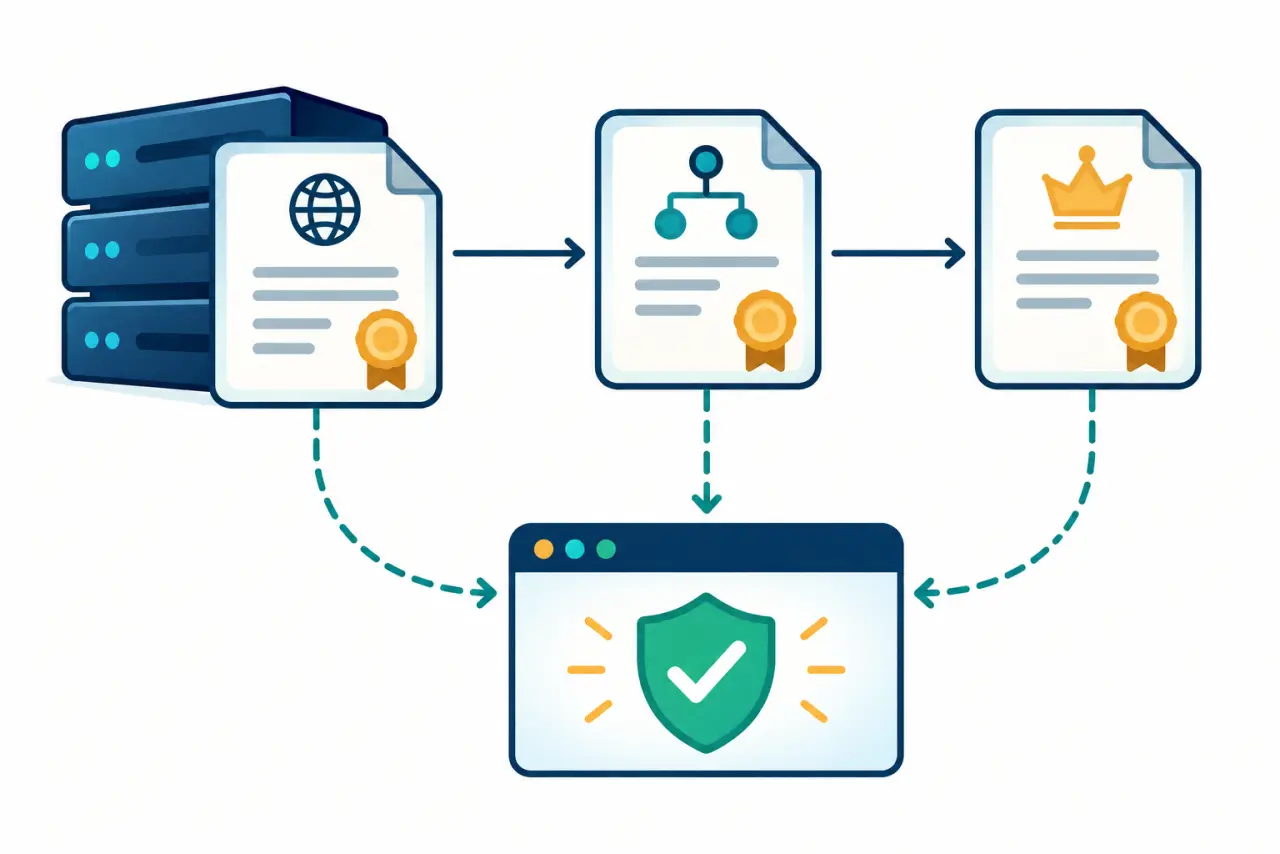
An SSL certificate chain is the trust path a client uses to decide whether a server certificate is acceptable. The leaf certificate names your hostname. An intermediate certificate links that leaf to a certificate authority root. The root is normally already trusted by the client, so the server usually sends the leaf and intermediate certificates, not the root.
Chain problems are often configuration problems rather than certificate-signing problems. A valid leaf can still produce a warning when the intermediate is missing, the order is wrong, or the server sends a certificate for a different hostname. This guide shows how to read the pieces and test the live endpoint.
The three roles
- Leaf certificate: the certificate whose subject or SAN contains the hostname a client requested.
- Intermediate CA: the certificate that signed the leaf and provides a path toward a trusted root.
- Root CA: a trust anchor stored in the browser, operating system, runtime, or device trust store.
Read the order before you edit the file
- Start with the live endpoint. Use the real hostname and port. A certificate file on disk may be correct while the web server still serves an older or incomplete bundle.
- Show every certificate. Run OpenSSL with -showcerts so the server response includes the certificates it actually sends.
- Compare subject and issuer. The issuer of the leaf should correspond to the subject of the next certificate in the path. Repeat the relationship until the client reaches a trusted root.
- Check the hostname. Read the Subject Alternative Name field. Common Name alone is not enough for modern hostname validation.
- Read the verification result. A successful handshake is not the same as a trusted chain. Look for the verify return code and the specific reason if verification fails.
- Fix the server bundle. Place the leaf first, followed by the required intermediates. Do not blindly append every certificate from a download page.
openssl s_client -connect example.com:443 -servername example.com -showcerts A real inspection checklist
For a live site, record the hostname, the leaf expiry, the SAN entries, the issuer, and the verification result. Then repeat the request from a second client or environment if the problem appears device-specific. A browser may have an intermediate cached from an earlier visit; a clean runtime will expose what the server actually sends.
When you have a PEM block rather than a live endpoint, paste it into the SSL Certificate Decoder to inspect its subject, issuer, validity, SAN, fingerprint, and signature algorithm. That is a file-level check, so pair it with the live OpenSSL command when debugging deployment.
Questions people usually ask
What is an SSL certificate chain?
Read the live chain and compare each certificate's subject and issuer.
Does the server send the root certificate?
Read the live chain and compare each certificate's subject and issuer.
Why does a browser accept a chain that a script rejects?
Read the live chain and compare each certificate's subject and issuer.
How can I inspect the chain with OpenSSL?
Read the live chain and compare each certificate's subject and issuer.
What does an incomplete chain look like?
Read the live chain and compare each certificate's subject and issuer.
Where can I decode a PEM certificate?
Read the live chain and compare each certificate's subject and issuer.
The shortest path to a reliable fix is evidence from the deployed endpoint: the exact chain, the exact hostname, and the exact verification error. Once those agree, the configuration change is usually small.