SSL Certificate Chain Order Explained: Why an Incomplete Chain Breaks HTTPS
The certificate on your site is fine—your chain isn't
You installed a shiny new SSL certificate, tested it in your browser, and the padlock shows up. A week later a customer in another country reports a scary "your connection is not private" warning, or your monitoring tool flags the site as having an incomplete chain. What happened? Nine times out of ten, the certificate itself is valid. The problem is the order and completeness of the chain your server sends along with it.
This trips up even experienced devs because the error messages are vague. Let's walk through what the chain actually is, why order matters, and how to check it without guessing.
What the certificate chain is
Think of it as a family tree of trust. At the bottom is your leaf certificate—this one is issued specifically to your domain. Above it sit one or more intermediate certificates, and at the very top is the root certificate, which browsers and devices already trust because they ship it in their trust store.
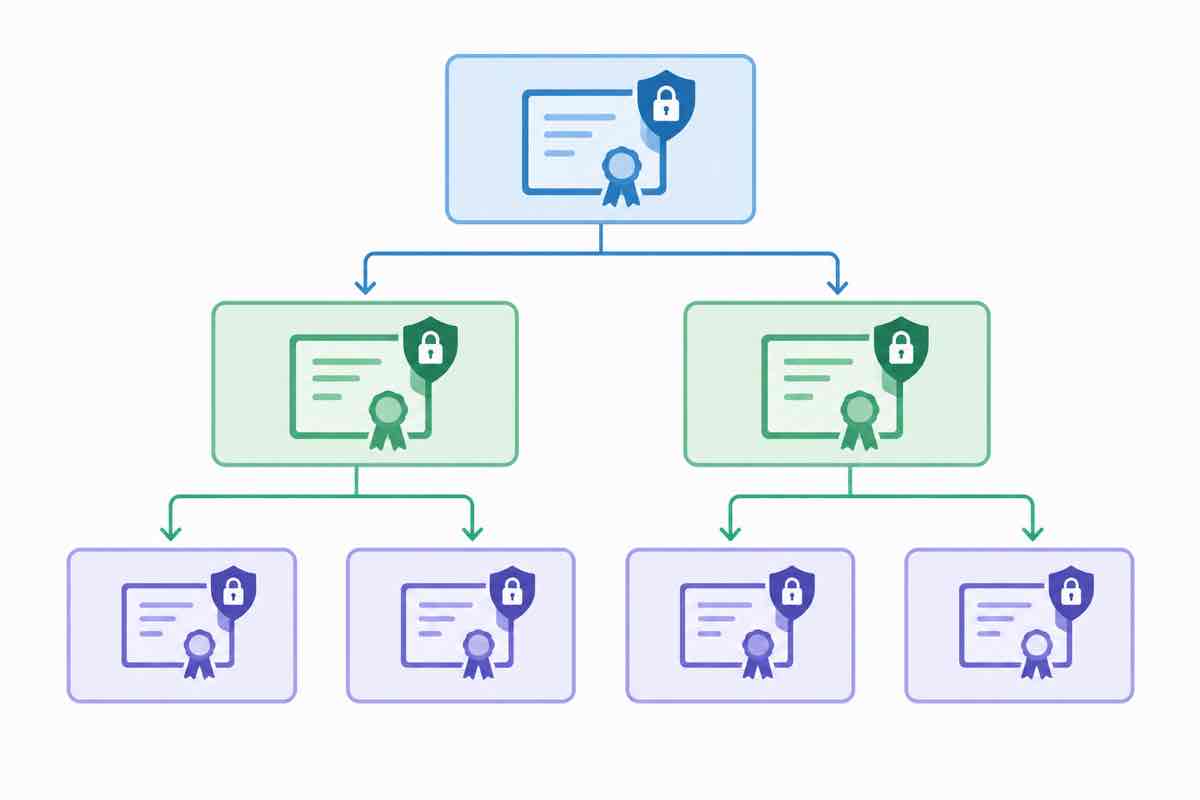
When a browser connects, your server should send the leaf certificate plus every intermediate in between. The browser then works upward until it lands on a root it already trusts. If you only send the leaf and skip the intermediates, the browser has to go fetch them itself—and some browsers, mobile OSes, or older HTTP clients won't bother. That's the "incomplete chain" failure.
Why the order matters
Browsers expect the chain to be sent leaf-first: your certificate, then the intermediate that signed it, then the next intermediate up. If you reverse them or duplicate certificates, some clients get confused and refuse to build the trust path. Most modern ACME setups (Certbot, Caddy, Traefik) get this right automatically, but when you paste certificates into a control panel or a reverse proxy by hand, ordering becomes a real footgun.
The tools that tell you the truth
Don't trust your own browser alone—it caches intermediates aggressively, so a broken chain can look fine on your machine while being broken for everyone else. Use an external checker like SSL Labs Server Test, or decode the chain directly with our SSL certificate decoder to see exactly which certificates your server is presenting and in what order. You're looking for a chain that reads cleanly from leaf up to a trusted root, with no missing links.
The quick fix
If your chain is incomplete, the usual culprit is the certificate file you concatenated. Your provider usually gives you a fullchain file that already contains leaf + intermediates in the right order. Use that, not the bare leaf file. Restart your web server, re-run the external checker, and wait for caches to clear.
It's a small thing to get wrong, and an annoying thing to debug in production. Five minutes of checking the chain order up front saves a very long support thread later.